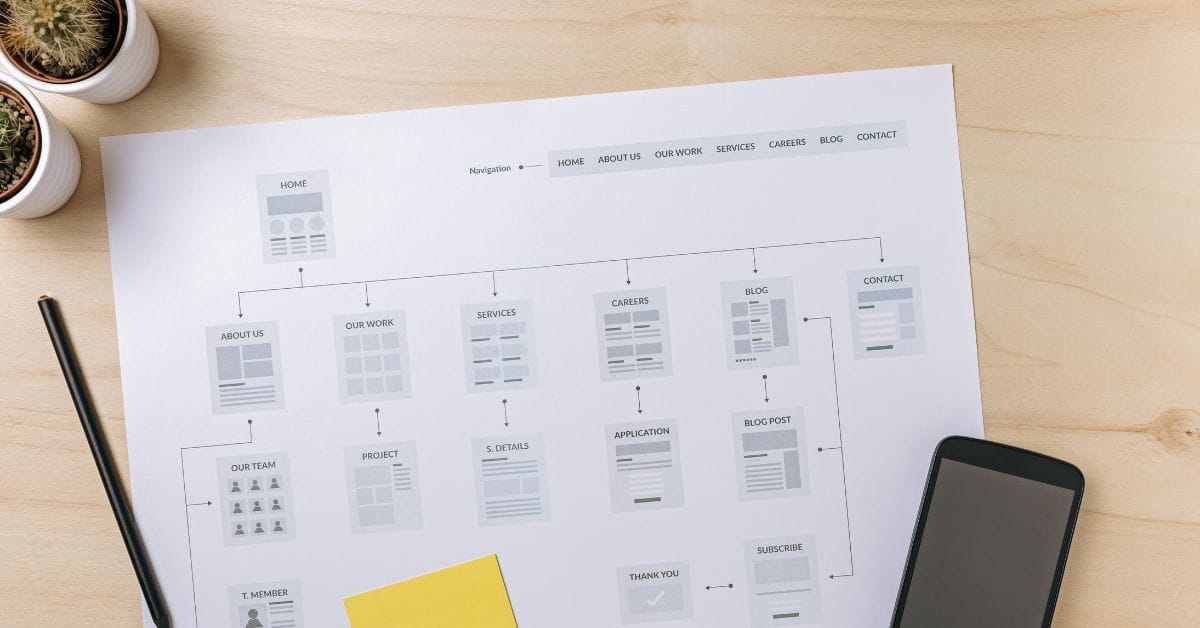
Are you trying to find your sitemap on BigCommerce but aren’t sure where to look? Whether you’re submitting your sitemap to Google for faster indexing or want to know how to navigate the different sitemap options, this video will walk you through the steps.
Watch this video to learn:
- Where to find both the visual sitemap and the XML sitemap in BigCommerce.
- How each type of sitemap is used, and why both are important for your site’s visibility.
As a BigCommerce store owner and developer since 2010, I’ve encountered this question countless times. In this quick tutorial, I’ll show you exactly where to locate your sitemap in BigCommerce, making it easy for you to manage your site’s SEO efficiently.
Video Summary: “Where is the Sitemap on BigCommerce?”
Here are the key points covered in the video, along with timestamps for easy reference:
- (00:00) Introduction to Kal, a BigCommerce store owner and developer, and the two types of sitemaps: visual sitemap and XML sitemap.
- (00:25) The visual sitemap (
sitemap.php) is located in the footer of your website. It’s an HTML page with links to important pages on your site, useful for both users and crawlers. - (01:01) The XML sitemap (
xmlsitemap.php) is a hard-coded URL for submitting to Google and other search engines for faster crawling and indexing. - (01:54) The XML sitemap contains links to sub-sitemaps, like category pages, which Google follows automatically to crawl your entire site.
- (02:14) Recap of both sitemaps and their purposes, and an invitation to contact Kal for further assistance with your BigCommerce store.
By understanding these two sitemaps and their functions, you can ensure that search engines like Google are indexing your site properly, which can lead to better SEO performance. Watch the video above for a detailed walkthrough!
Full Transcript
(00:00)
Are you guys looking for your sitemap on BigCommerce? Let me show you where it is. Before we get started, my name is Kal. I’m a store owner just like you, as well as a developer of BigCommerce stores since 2010. Let me show you where to find it. I’ll share my screen.
First of all, there are two different sitemaps that you should know about: the visual sitemap and the XML sitemap. You’re probably looking for the XML sitemap, but I want to make sure you understand both.
(00:25)
If you click the sitemap link in your footer (usually installed with your theme), it takes you to sitemap.php. This is what I call the visual sitemap because it’s an actual HTML page where you can see links to the most important pages on your site. This is helpful for both users and crawlers. You’ll want to leave this in your footer so crawlers can easily find it.
The second sitemap is the one you give to Google: the XML sitemap. You can find it at xmlsitemap.php. Just add /xmlsitemap.php after your domain name, and this will work on every BigCommerce store. This URL is hard-coded, so it will be the same no matter what theme you’re using.
(01:19)
This is the sitemap you give to Google and other crawlers if you want to submit it for faster crawling of your site. When you go to xmlsitemap.php, you’ll see four or five (maybe six) links, depending on your setup. These links refer to sub-sitemaps—lower-level sitemaps.
For example, if you follow the link to the categories sitemap, it will take you to a page with all your categories. Google knows how to crawl these, so once you give them the main URL, they’ll follow each of these sub-sitemap links to crawl everything on your site.
(02:14)
So, to recap:
xmlsitemap.php is the sitemap you submit to Google.
sitemap.php is the visual sitemap in your footer.
Hopefully, you found this useful. If not, leave me a comment and let me know what you’re stuck on. If you need help with your store, reach out to me at epicdesignlabs.com. I’d love to hear from you. Thank you so much!

Related Resources
View All →
3 ways to Add or Edit a Carousel on BigCommerce
If you’re looking to enhance your BigCommerce store’s design with a sleek carousel or slideshow, you’re in the right place. \[…\]
Add a Free Gift with Purchase on BigCommerce
Looking for a way to boost customer loyalty and increase sales on your BigCommerce store? Offering a free gift with \[…\]
Add Products to the Homepage of Your BigCommerce Store
In this video tutorial, I walk you through two simple ways to add products to your BigCommerce store homepage, helping \[…\]
BigCommerce Sitemaps 101
Are you ready to supercharge your BigCommerce store’s SEO? If you’ve ever wondered about the ins and outs of sitemaps \[…\]

Edit the Newsletter Optin Block on BigCommerce
Are you looking to customize the “Subscribe to our Newsletter” box on your BigCommerce store? In this video, I walk \[…\]
Editing Products via CSV in BigCommerce
Managing products in your BigCommerce store can become overwhelming as your inventory grows, but CSV editing makes bulk updates quick \[…\]
Editing Custom Fields via CSV in BigCommerce
Are you looking to efficiently manage custom fields for your products in BigCommerce? Editing via CSV is a powerful method \[…\]
Getting Started with Product Images on BigCommerce
Are you struggling to upload product images to your BigCommerce store? In this video, Kal Wiggins, an ecommerce expert and \[…\]
High-Risk Permissions in BigCommerce
BigCommerce has continuously provided merchants with tools to bolster sales staff their e-commerce stores. One of the latest features to \[…\]